Flight school: radio#
To talk to the tower, follow a navaid or be seen on radar you need the radios. This page shows which radios there are, how to tune a frequency in FlightGear and how a flight from Erfurt to Leipzig sounds on the radio. To talk to a controller in FlightGear, use the add-on Red Griffin ATC.
The radios#
Radio |
Range |
Used for |
|---|---|---|
COM |
118.000–136.975 MHz |
talking to controllers, listening to the weather (ATIS) |
NAV |
108.00–117.95 MHz |
receiving navaids (VOR) and the landing course (ILS) |
ADF |
about 200–1750 kHz |
needle pointing to an NDB (simple navaid) |
DME |
via the NAV frequency |
distance to the navaid in nautical miles |
Transponder |
four-digit code |
radar sees the aircraft with code and altitude |
Active and standby#
Almost every radio shows two frequencies: on the left the active one (you talk and listen on it), on the right the standby one (STBY). You always tune the new frequency in standby and then swap with the transfer button (⇄). That way you stay reachable on the old frequency until the new one is ready, and can go back with one press if nobody answers.
Cessna 172#
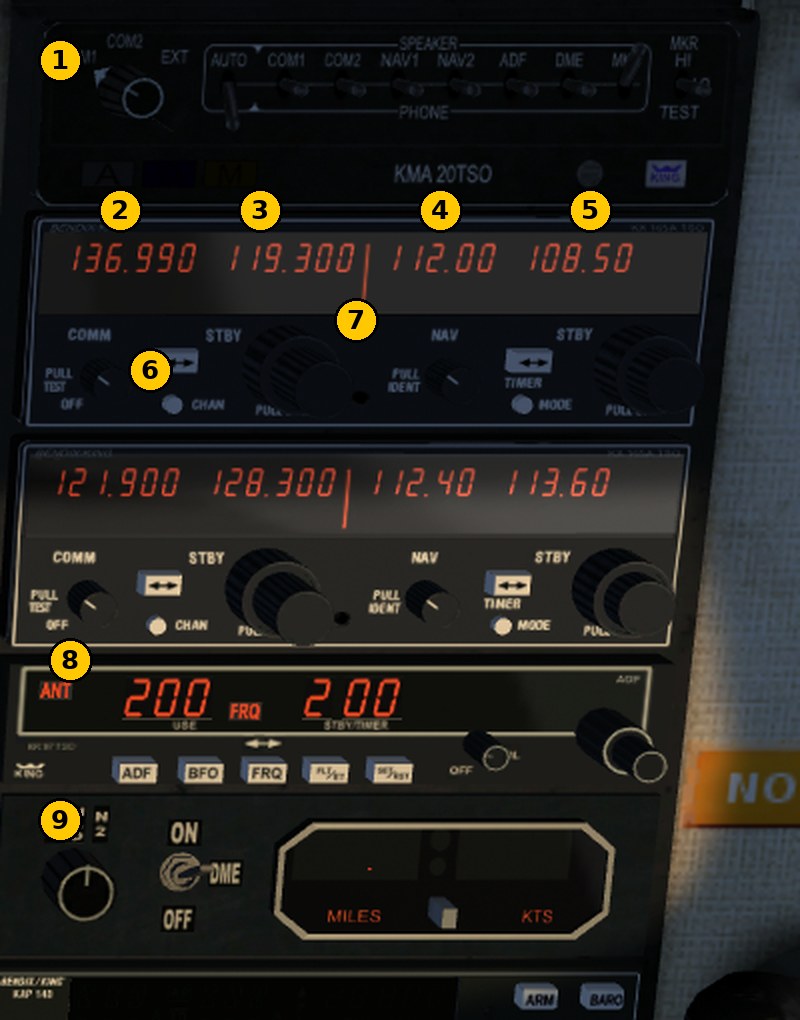
No. |
Control |
What it does |
|---|---|---|
1 |
Audio panel KMA 20 |
rotary switch: which radio transmits (COM1/COM2), toggles: what you hear |
2 |
COM active |
frequency you talk on |
3 |
COM standby |
next frequency |
4 |
NAV active |
tuned navaid |
5 |
NAV standby |
next navaid |
6 |
COM transfer button |
swap active and standby |
7 |
Frequency knob |
outer ring: MHz, inner knob: kHz (tunes standby only) |
8 |
ADF |
active on the left, standby on the right (NDB) |
9 |
DME |
distance to NAV1 or NAV2 |
Autopilot and transponder follow below. The second unit below the first is COM2/NAV2 and works the same way.
In FlightGear: turn knobs with the mouse wheel or by clicking left/right, click the transfer button. More convenient is the dialog Equipment → Radio Settings (key F12): type the frequencies for COM, NAV, ADF and the transponder code directly, the same for every aircraft.
Dash 8#
The Dash 8 radios sit in the rear part of the centre console, between the seats: the pilot’s on the left, the co-pilot’s on the right. The NAV radios for VOR and ILS are at the front on the glareshield.
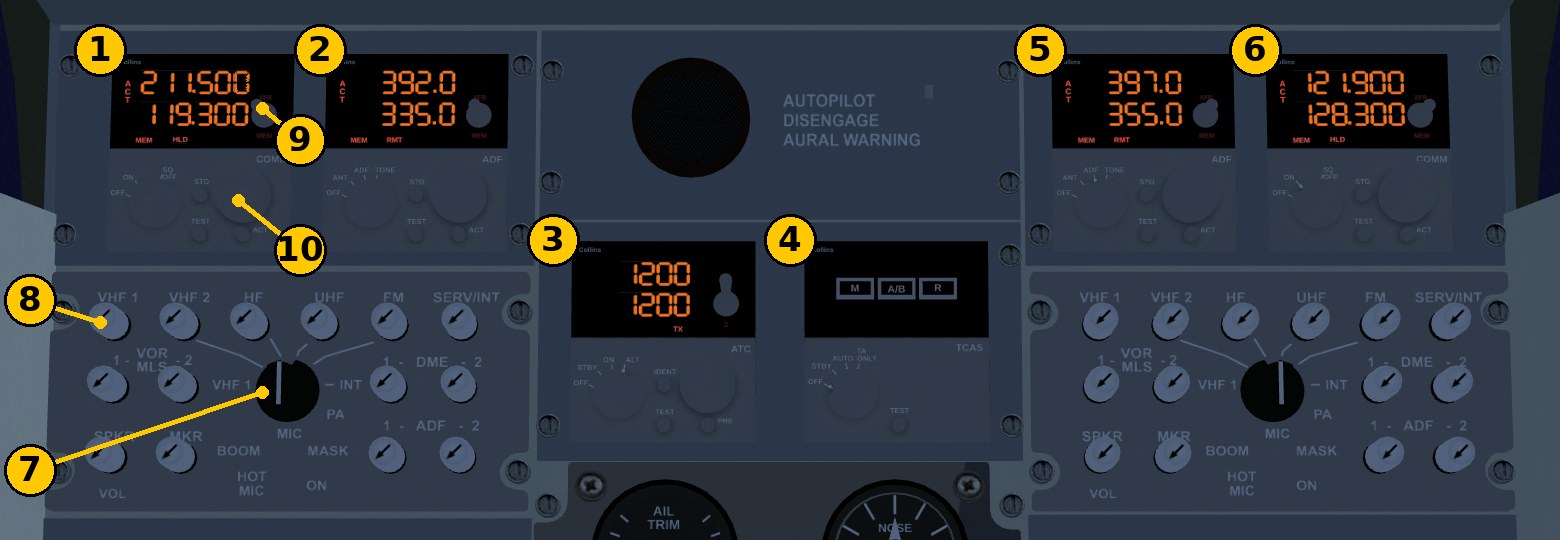
No. |
Control |
What it does |
|---|---|---|
1 |
COMM 1 |
active frequency at the top (ACT), standby below |
2 |
ADF 1 |
NDB frequency, active at the top, standby below |
3 |
Transponder (ATC) |
code; the default 1200 is the US VFR code, in Germany use 7000 |
4 |
TCAS |
traffic warning, mode STBY / TA ONLY / AUTO |
5, 6 |
ADF 2, COMM 2 |
the co-pilot’s radios |
7 |
Microphone selector (MIC) |
which radio transmits, e.g. VHF 1 |
8 |
Volume knobs |
what you hear: VHF 1, VHF 2, VOR, DME, ADF, marker beacons |
9 |
XFR/MEM button |
swap active and standby |
10 |
Frequency knob |
outer ring: MHz, inner knob: kHz in 25 kHz steps, standby only |
F12 is faster here as well.
Frequencies Erfurt and Leipzig#
From FlightGear’s airport data. Real frequencies change; for a real flight always use the current chart or AIP.
Station |
Erfurt-Weimar (EDDE) |
Leipzig/Halle (EDDP) |
|---|---|---|
ATIS (weather, runway) |
135.175 |
120.525 |
Apron / Ground |
121.900 / 121.750 |
121.800 |
Tower |
121.150 |
119.700 / 121.100 |
Approach |
124.175 (Munich Radar) |
119.700 / 124.175 |
Radio calls like real pilots#
Three rules are enough to start:
Listen first. Before the first call, listen to the ATIS. It gives wind, runway, pressure (QNH) and a letter (“information Alpha”). Mention that letter in your call so the controller knows you have the weather.
The first call has a fixed order: who you call, who you are, where you are, what you want.
Read back: clearances, runway, taxi instructions with holding points, altitudes, frequencies, transponder code and pressure are repeated, with your callsign at the end.
A VFR flight with the Cessna D-ETTV from Erfurt to Leipzig, shortened:
When |
Frequency |
Pilot |
Controller |
|---|---|---|---|
before engine start |
ATIS 135.175 |
(listen) |
“… information Alpha, runway 10, wind 080 degrees 6 knots, QNH 1013 …” |
taxi |
Ground 121.750 |
“Erfurt Ground, D-ETTV, Cessna 172 on the apron, information Alpha, VFR to Leipzig, request taxi.” |
“D-TV, taxi to holding point runway 10, QNH 1013.” |
read back |
“Taxi to holding point runway 10, QNH 1013, D-TV.” |
||
ready |
Tower 121.150 |
“Erfurt Tower, D-TV, holding point runway 10, ready for departure.” |
“D-TV, wind 080 degrees 6 knots, runway 10, cleared for take-off.” |
read back |
“Runway 10, cleared for take-off, D-TV.” |
||
before Leipzig |
ATIS 120.525, then Tower |
“Leipzig Tower, D-ETTV, Cessna 172, 10 miles west, 2500 feet, information Bravo, for landing.” |
approach instructions |
after landing |
Ground 121.800 |
“Leipzig Ground, D-TV, runway 08R vacated, request taxi to the apron.” |
Only shorten your callsign (D-ETTV → D-TV) after the controller has done so.
Transponder#
Code |
Meaning |
|---|---|
7000 |
VFR without an assigned code (Germany) |
7700 |
emergency |
7600 |
radio failure |
7500 |
hijack |
Set a code the controller assigns (“squawk 4521”) and read it back. In an emergency, fly first, then talk: “Mayday, Mayday, Mayday”, callsign, problem, position, intention. The emergency frequency is 121.500 MHz.
In FlightGear with Red Griffin ATC#
With the add-on Red Griffin ATC controllers answer by voice and text. How to use it:
menu Red Griffin ATC → Open/Close ATC dialog or the \ key (backslash)
choose the request in the dialog (engine start, taxi, take-off, approach …); Ctrl+4 to Ctrl+7 work from the keyboard
the COM radio must be tuned to the station’s frequency, otherwise nobody or the wrong station answers
Our flight scripts tune the frequency themselves and talk through a small helper (see Red Griffin ATC).
Quick reference#
Step |
Remember |
|---|---|
change frequency |
tune standby, then swap |
first call |
who, who, where, what |
clearances |
always read back, callsign at the end |
VFR |
transponder 7000 unless assigned |
emergency |
7700, Mayday, 121.500 |
FlightGear |
F12 for all frequencies, backslash for Red Griffin |