Dash 8 FMS#
The front centre pedestal of the Dash 8-100, -200 and -300 holds a Universal UNS-1 flight management system. Real Dash 8-200s were retrofitted with it; the -200/-300 operating manual lists dual UNS-1C. In the free model it only showed a DATA menu without function. With the Dash 8 patch it can be used: enter a flight plan, read the waypoints, fly direct to a waypoint and let the autopilot fly the plan.
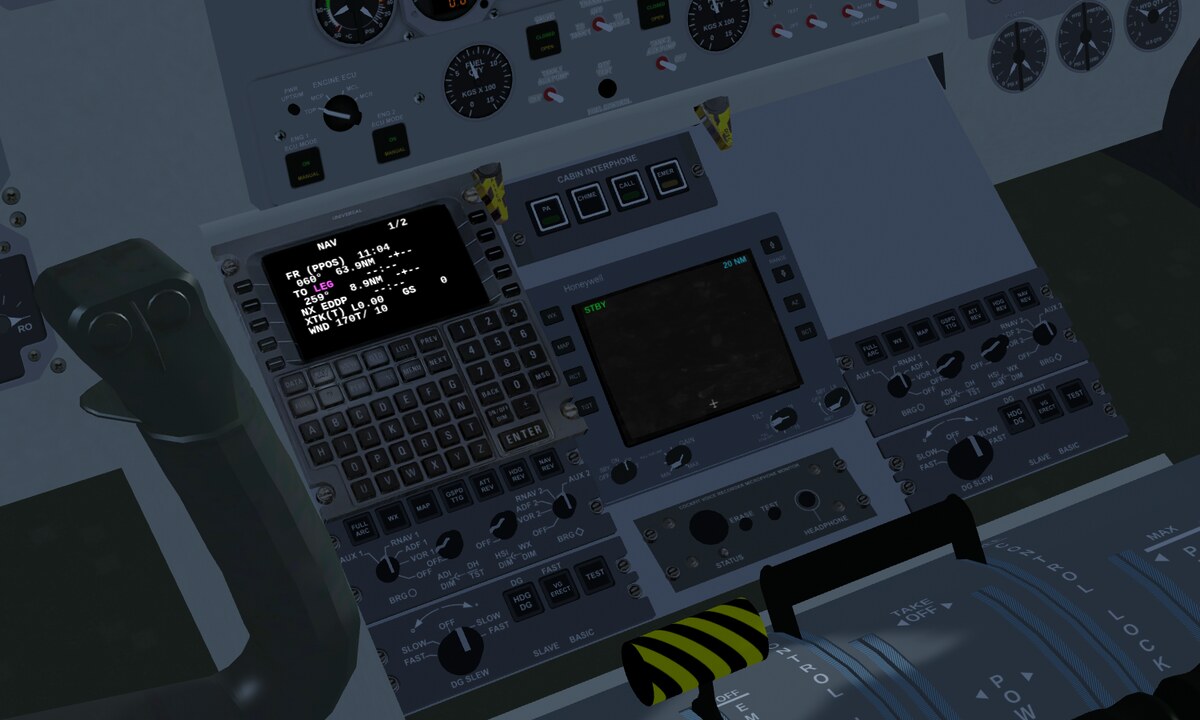
The Q400 (-400) has no UNS-1; nothing changes there.
How it works#
The FMS does not compute the route itself; it uses FlightGear’s route manager. Whatever you enter in the FMS also shows up under Autopilot → Route Manager, and vice versa. On top of that the FMS computes the cross-track error and gives the autopilot a course to fly.
Power: the FMS is on the left main bus. With the battery alone it stays dark. On the ground it needs external power or a running generator.
Entering a flight plan#
Example: Erfurt → Leipzig via the beacons Erfurt (ERF), Gotha (GOT) and Leipzig (LEG).
Press ON/OFF DIM. After the self-test the INIT page shows the nearest airport, the position and the time. Confirm with ACCEPT (bottom left line select key).
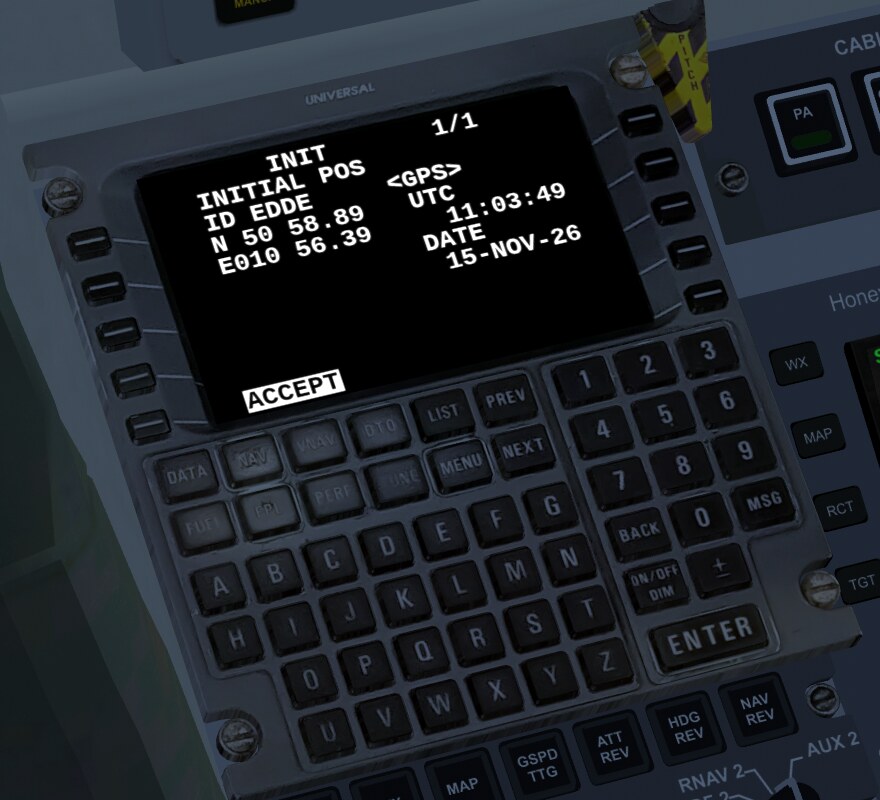
Press FPL. On the ground the nearest airport is already waypoint 1 and the cursor sits on waypoint 2.
Type an identifier, for example
ERF, then ENTER. The FMS shows what it found: type, name, coordinates, bearing and distance. Accept with ENTER or ACCEPT. If there are several matches, page through them with PREV/NEXT.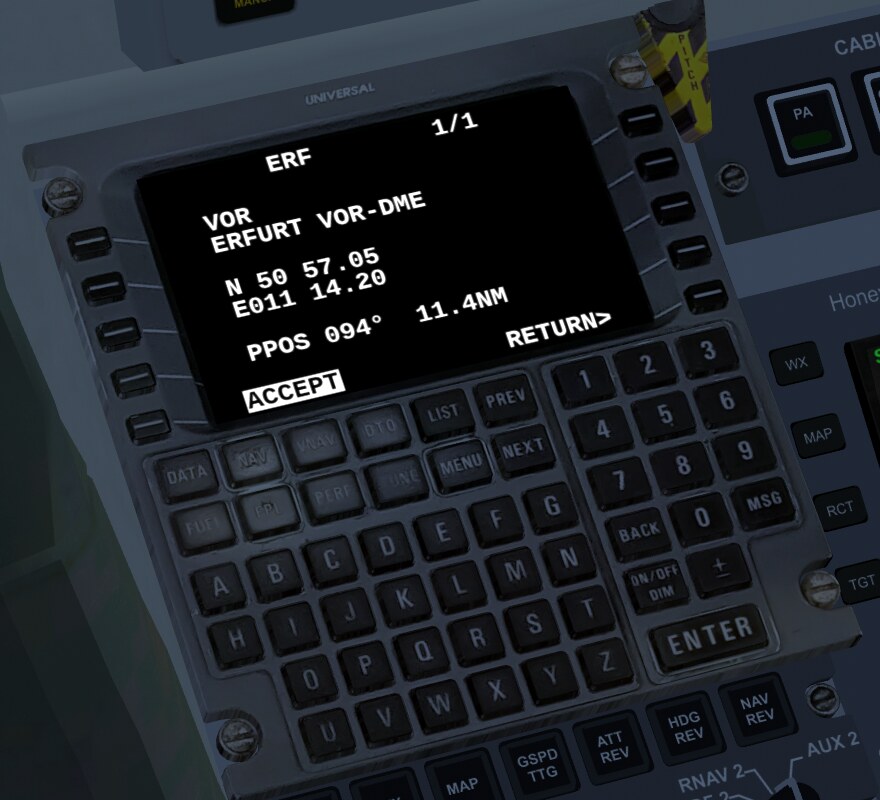
Continue with
GOT,LEGand the destinationEDDP. Below each waypoint you see course and distance of the leg. The active waypoint is magenta and marked with>. Five waypoints fit on a page; NEXT shows the rest.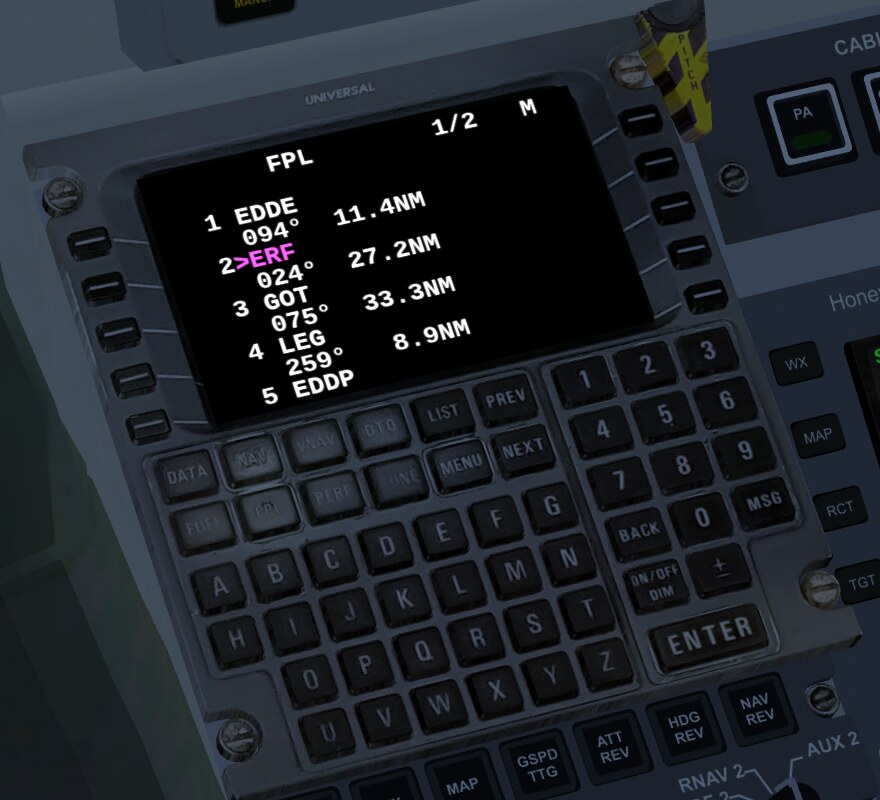
Changing and deleting: on FPL, press the line select key next to a waypoint and type a new identifier to insert it before that waypoint. To delete, select the waypoint with its line select key and press DEL (top right line select key) twice. MENU on the FPL page → DELETE FPL (twice) deletes the whole plan.
NAV page#
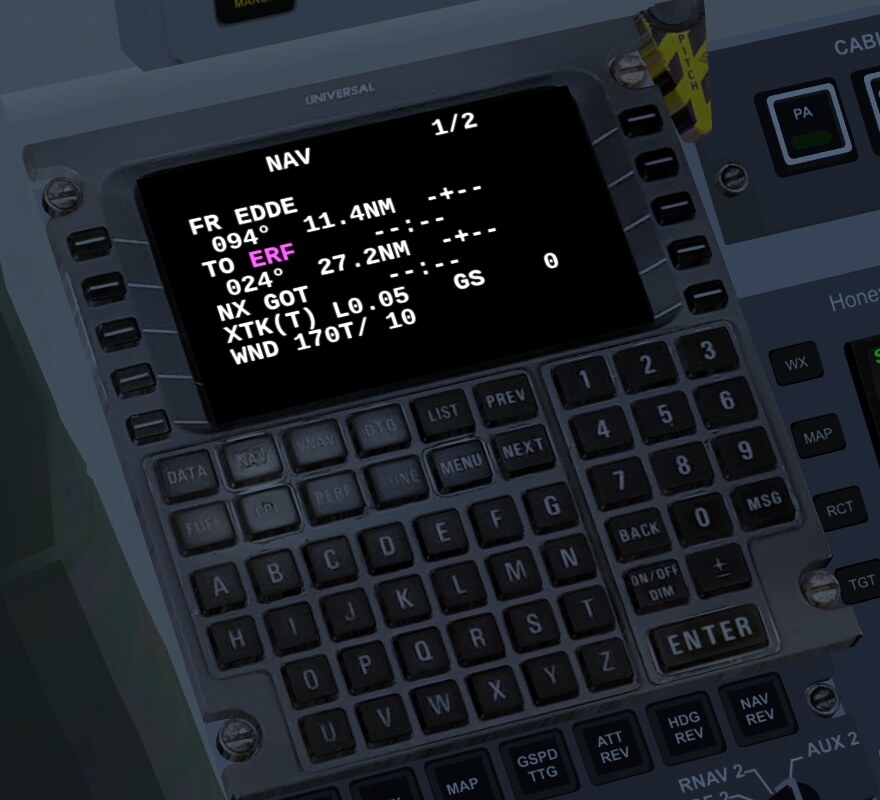
NAV shows the flight: FR (from), TO (to, magenta), NX (next), each with course, distance, time to go and arrival time. Below that the cross-track error (XTK, L/R), ground speed and wind. NAV 2/2 adds head- or tailwind and bearing.
Direct to a waypoint (DTO)#
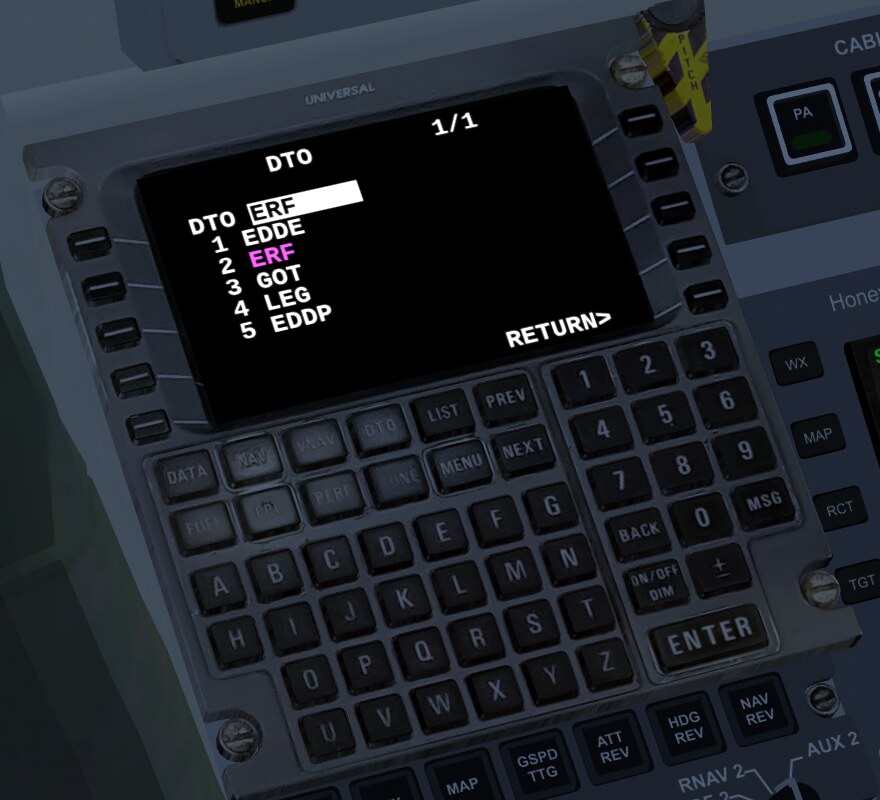
Press DTO, type the number from the list (for example 4) and ENTER. NAV then shows FR (PPOS) with the time: the leg now runs from the present position to the chosen waypoint.
If the autopilot is flying the plan (next section), it turns towards the waypoint and then flies a straight line to it. At the waypoint the flight plan continues as usual.
Letting the autopilot fly the plan#
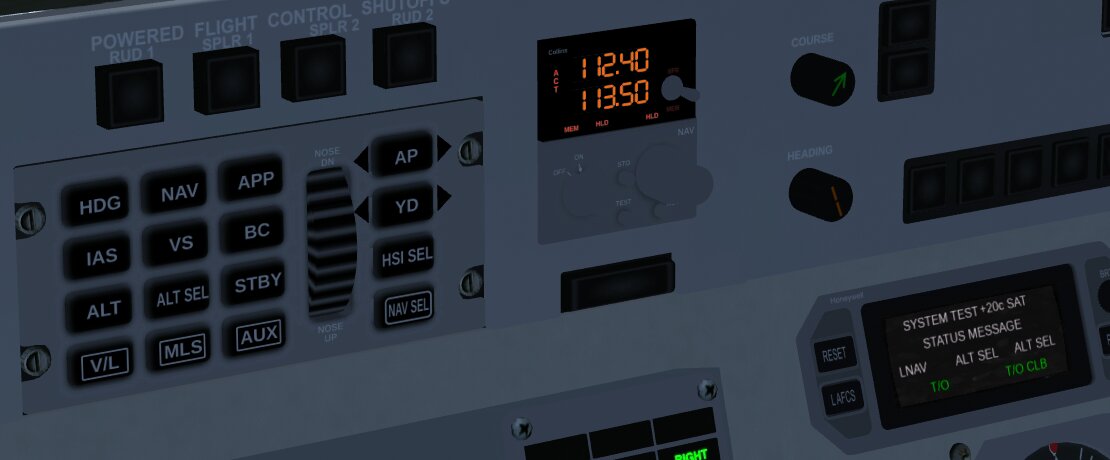
As in the real -200: on the autopilot controller, AUX selects the FMS as navigation source, then NAV engages lateral guidance.
Enter the flight plan and select NAV on the FMS.
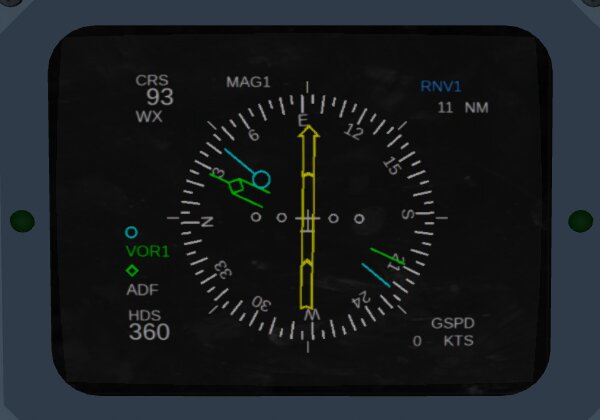
Press AUX on the autopilot. The EHSI shows RNV1 in blue at the top right, the course of the active leg (CRS) and the distance to the next waypoint. The deviation bar shows the distance from the leg, one dot is 3.75 NM.
Press NAV. On the ground this only arms LNAV (LNAV in white); in the air it becomes active. The EADI and the display to the right of the controller show LNAV.
Engage the autopilot with AP, set altitude and climb rate as usual with ALT SEL and VS.
The autopilot then holds the leg, not just the direction to the waypoint. It steers a track over ground, so wind is taken care of. If the aircraft is off the leg, it turns towards it at up to 45°. Before each waypoint the FMS switches to the next one with some lead, so the turn ends on the new leg. 15 seconds before that, WPT appears in amber on the left of the EHSI. After the last waypoint the aircraft keeps flying along the extended leg.
Changing the source: if you press V/L (radio instead of FMS) while LNAV is active, LNAV drops out and the autopilot holds the current heading (HDG). The original does the same; there the flight director then has no lateral guidance.
If the FMS fails (switched off, no power, no flight plan), the autopilot in LNAV flies as before the patch: directly towards the route manager’s active waypoint.
Not built yet#
VNAV, FUEL, PERF, TUNE and LIST are not built yet. These keys can be pressed but do nothing. There is only the captain’s FMS and EHSI, no second set for the first officer (RNV2). The MAP view, FMS approaches and the annunciators on the glareshield are also missing.
For your own scripts#
The FMS also works without a mouse. Write the key name to /instrumentation/FMS/inputs/key and text to /instrumentation/FMS/inputs/text. Over the telnet interface a flight plan looks like this:
set /instrumentation/FMS/inputs/key ONOFF
set /instrumentation/FMS/inputs/key L5
set /instrumentation/FMS/inputs/key FPL
set /instrumentation/FMS/inputs/text ERF
set /instrumentation/FMS/inputs/key ENTER
set /instrumentation/FMS/inputs/key ENTER
set /instrumentation/FMS/inputs/key NAV
Wait a few seconds between ONOFF and L5 (ACCEPT) until the self-test has finished. For every further waypoint repeat the three lines with text and ENTER. The line select keys are called L1 to L5 and R1 to R5.
AUX and NAV on the autopilot correspond to these properties:
set /it-autoflight/settings/nav-source FMS
set /it-autoflight/input/lat 1
Property |
Content |
|---|---|
|
screen lines |
|
cross-track error in NM, negative = left |
|
course of the active leg, magnetic |
|
FMS is guiding (flight plan active, power on) |
|
track over ground the FMS gives the autopilot |
|
WPT alert |
|
number of the active waypoint |
I tested this with FlightGear 2024.1.7: a script entered the plan Erfurt → Gotha → Leipzig via the keys, and from 3000 ft the autopilot took over via AUX and NAV. Before the first waypoint it was 0.04 NM off the leg. At each waypoint the FMS switched exactly once, 0.7 to 0.9 NM before it. After a DTO it flew a straight line, and with V/L LNAV dropped out.